Why Are My Emails Going to Spam? A Troubleshooting Checklist
Few IT problems frustrate a business owner more than hearing "it went to my junk folder". Quotes go unanswered, invoices go unpaid and customers assume you have ignored them.
The good news is that most spam-folder problems have a technical cause you can find and fix. Receiving mail systems such as Gmail, Outlook.com and corporate filters look at a stack of signals before deciding where a message goes. This checklist works through those signals in roughly the order receivers check them, from the connection itself up to the words in your message.
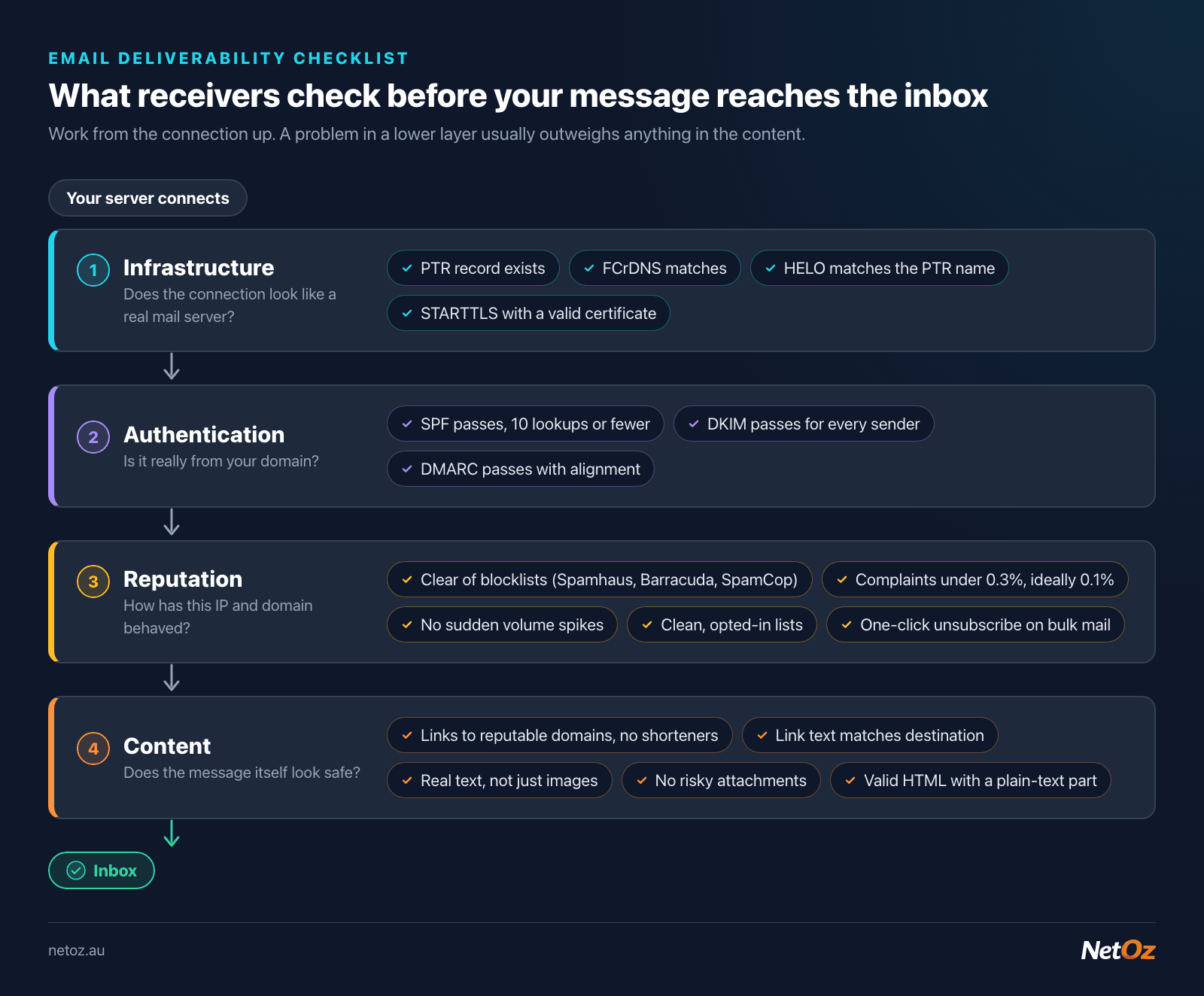
Work from the bottom layer up: a connection or authentication problem usually outweighs anything in the content.
Before you start: gather evidence
Get three things before changing anything:
- A copy of an affected message's full headers. Ask a recipient who received it in spam to send you the original (in Gmail, "Show original"; in Outlook, "View message source" or message properties). The
Authentication-ResultsandReceivedlines tell you a lot. Our email header analyser breaks them down into readable parts. - Which providers are affected. Is it only Gmail? Only one customer's company? Everyone? A problem with one receiver points to reputation or a filter there. A problem with everyone points to your setup.
- When it started. A sudden change usually lines up with something: a new website plugin, a migrated mailbox, a compromised account or a DNS change.
Then run your domain and sending server through our mail server check. It tests most of the items below in one go.
1. Reverse DNS (PTR) and forward-confirmed reverse DNS
Every server that sends mail connects from an IP address. Receivers look up that IP's reverse DNS (PTR) record to find a hostname, then look that hostname up again to check it points back to the same IP. When both directions match, that is called forward-confirmed reverse DNS (FCrDNS).
What good looks like:
203.0.113.25   PTR   mail.example.com.au.
mail.example.com.au.   A   203.0.113.25
Common problems:
- No PTR at all. Many receivers reject or heavily penalise mail from IPs with no reverse DNS. Google's sender guidelines require it.
- A generic PTR such as
203-0-113-25.static.isp.example. This looks like a home or office connection rather than a mail server. - A PTR that does not resolve back to the same IP.
- A mismatched HELO. The name your server announces when it connects should match the PTR name, or at least be a valid name that resolves.
If you use a hosted provider such as NetOz Email, Microsoft 365 or Google Workspace, they manage this for their servers. It matters most if you run your own mail server, or if a device or app on your network sends directly. We cover this in detail in our post on reverse DNS and FCrDNS for mail servers.
2. Blocklists
Your sending IP, and sometimes your domain, may be listed on a DNS-based blocklist (DNSBL). Well-known lists include those run by Spamhaus, Barracuda and SpamCop. A listing on a widely used list can push mail to spam or cause outright rejections.
Check your sending IP with our blacklist checker. If you find a listing, do not just request removal. Find out why you were listed first, or you will be relisted. Typical causes are a compromised mailbox password, an infected computer on your network, or a vulnerable website form being used to send spam. Our guide to getting your mail server IP off a blacklist covers this step by step.
3. Authentication: SPF, DKIM and DMARC
Look at the Authentication-Results header from a spam-foldered message. You want to see:
spf=pass
dkim=pass header.d=example.com.au
dmarc=pass header.from=example.com.au
If any of them fail or are missing, that is very likely part of your problem. The common causes:
- SPF fails because a sending service (your website, CRM or invoicing system) is not in your SPF record, or the record goes over the 10 DNS lookup limit, which causes a permanent error. Check it with our SPF validator.
- DKIM is missing because signing was never turned on for one of your senders, or the DNS record was copied incorrectly.
- DMARC fails even though SPF passes, because SPF passed for a different domain (the sending service's own domain) rather than the domain in your From address. The fix is usually to set up DKIM for that service using your domain.
Our step-by-step guide to setting up SPF, DKIM and DMARC covers every record in detail. If NetOz hosts your email, see Set up DKIM email signing for your domain.
4. Gmail and Yahoo sender requirements
In February 2024, Google and Yahoo began enforcing new requirements for anyone sending to their users. They have tightened enforcement since, and Microsoft has announced similar expectations for high-volume senders to its consumer services. Check each provider's current guidelines, as details change, but the core rules at the time of writing are:
For everyone sending to Gmail:
- SPF or DKIM for your sending domain
- Valid forward and reverse DNS for the sending IP
- TLS for the connection
- A spam complaint rate reported in Google Postmaster Tools kept below 0.3%, with Google recommending staying below 0.1%
- Messages formatted to the internet message standard (RFC 5322)
For bulk senders (Google defines these as sending close to 5,000 or more messages a day to Gmail accounts):
- Both SPF and DKIM
- A DMARC record, which can be
p=none - The From domain aligned with either the SPF or DKIM domain
- One-click unsubscribe for marketing and subscribed messages, using the
List-UnsubscribeandList-Unsubscribe-Postheaders (RFC 8058), with unsubscribes honoured within two days - A clear unsubscribe link in the message body
Most reputable newsletter platforms add the unsubscribe headers for you, but only if you send through them properly and have authenticated your domain in their settings. If you send newsletters from your own server or a plugin, check carefully.
Even if you are nowhere near 5,000 a day, treat the bulk sender rules as best practice. They are what good senders already do.
5. Transport security
Receivers expect your server to offer encryption (STARTTLS) with a valid certificate. An expired or mismatched certificate on your mail server can count against you and break some connections entirely. Our mail server SSL/TLS checker shows the certificate presented on SMTP, IMAP and POP3 ports.
6. Reputation and sending behaviour
Even with perfect DNS, receivers judge you on how recipients react to your mail. Things that hurt:
- Sending to old or purchased lists. Invalid addresses cause bounces, and old addresses may be recycled as spam traps.
- Sudden volume spikes, such as a new server or IP sending thousands of messages on its first day. Increase volume gradually on new infrastructure.
- High complaint rates. If recipients click "Report spam", that feeds directly into your reputation. Make it easier to unsubscribe than to complain.
- Low engagement. Mail that is never opened, or is deleted unread, can gradually shift to spam for those recipients.
- Mixing transactional and marketing mail. If your newsletter gets complaints, it can drag down the reputation of your invoices too. Consider sending marketing from a subdomain such as
news.example.com.auor through a dedicated platform.
Google Postmaster Tools and Microsoft's Smart Network Data Services (SNDS) give senders insight into how those providers see their domain or IP. Both are free and worth setting up if you send regularly.
7. Content and formatting
Content matters less than it used to compared with authentication and reputation, but it still counts:
- Links to poor-reputation domains, including URL shorteners, can trigger filters. Link to your own domain where you can.
- Mismatched link text, where the displayed URL differs from the real destination, looks like phishing.
- Image-only emails with little or no text are a classic spam pattern.
- Attachments such as macro-enabled Office files, or archives containing executables, are often blocked outright. Share large or sensitive files with a link instead.
- Broken HTML and missing plain-text parts can count against you.
- Spoofed-looking display names, such as a From name that is a different email address, are treated with suspicion.
You do not need to avoid normal words like "free" or "invoice". Modern filters look at the whole picture, not a list of banned words.
8. Recipient-side causes
Sometimes the problem is not you:
- The recipient's organisation may have a strict filter or a rule moving external mail.
- The recipient may have previously marked one of your messages as spam.
- Their IT team may need to allowlist your domain.
If only one organisation is affected and everything above checks out, ask the recipient to mark your message as "Not spam" and add you to their contacts, or talk to their IT team.
The checklist
- Headers collected from an affected message
- PTR record exists, is not generic, and resolves back (FCrDNS)
- Sending IP clear of major blocklists
- SPF passes and is under 10 lookups
- DKIM passes for every sending service
- DMARC published and passing with alignment
- One-click unsubscribe on marketing mail
- Complaint rate below 0.3%, ideally below 0.1%
- Valid TLS certificate on the mail server
- No sudden volume spikes; list hygiene in place
- Content free of risky links and attachments
Still stuck?
If you have worked through this and mail is still going astray, our Adelaide-based team can take a look. NetOz email hosting is $2 per user per month and includes DKIM signing for your domain. Or simply contact us to talk through the problem.
Need a hand with hosting or networking?
NetOz provides VM, managed and email hosting, DNS and colocation from a NextDC Tier IV facility in Adelaide.