How to Get Your Mail Server IP Off a Blacklist
You send an email and it bounces with something like 550 5.7.1 Service unavailable; client host [203.0.113.25] blocked using zen.spamhaus.org. Or customers tell you your mail is landing in spam, and a quick check shows your server's IP on a blacklist.
Blacklists, more properly called DNS-based blocklists (DNSBLs) or real-time blackhole lists (RBLs), are lists of IP addresses or domains that have been seen sending spam or behaving suspiciously. Mail servers around the world query them on every incoming connection. If your IP is listed on one that a recipient uses, your mail may be rejected or marked as spam.
This guide covers how to work out why you were listed, how to fix it, and how to get removed.
Step 1: Confirm the listing
Start by checking exactly which lists you are on. Use our blacklist checker to test your sending IP against a range of common DNSBLs. If you are not sure which IP your mail actually leaves from, look at the Received headers of a message you sent to an outside mailbox, or run our mail server check against your domain.
Note the result for each list. They are not all equal:
- Spamhaus lists are used very widely, including by many large providers. The main ones you will see are:
- SBL (Spamhaus Blocklist): IPs Spamhaus has identified as sources of spam or associated with spam operations.
- XBL (Exploits Blocklist): IPs showing signs of compromise, such as infected computers, bots or proxies.
- CSS: a component of the SBL for IPs sending low-reputation mail, often from compromised accounts or poorly configured systems.
- PBL (Policy Blocklist): IP ranges that are not expected to send mail directly, such as residential broadband. This is a policy list, not a judgement that you have done anything wrong.
- ZEN: a combined query covering the lists above.
- DBL: a domain blocklist, for domains found in spam messages.
- Barracuda Reputation Block List (BRBL) is used by Barracuda appliances and some other filters.
- SpamCop is driven by user spam reports and expires listings automatically.
- Other lists vary a lot in how widely they are used. Some list entire network ranges when a few addresses misbehave. A listing on an obscure list may have no real effect on your delivery.
Focus first on lists that are actually causing bounces or that major receivers rely on.
A note on false positives with Spamhaus
Spamhaus limits queries to its free public mirrors, and blocks queries made through large public DNS resolvers. If your own mail filter queries Spamhaus through a public resolver, it can get an error response that some software misreads as "listed". If you are seeing Spamhaus listings for everything, including mail from reputable senders, check your own resolver setup before assuming the sender is at fault. Spamhaus's own website lookup is the authoritative check for your IP.
Step 2: Find out why you were listed
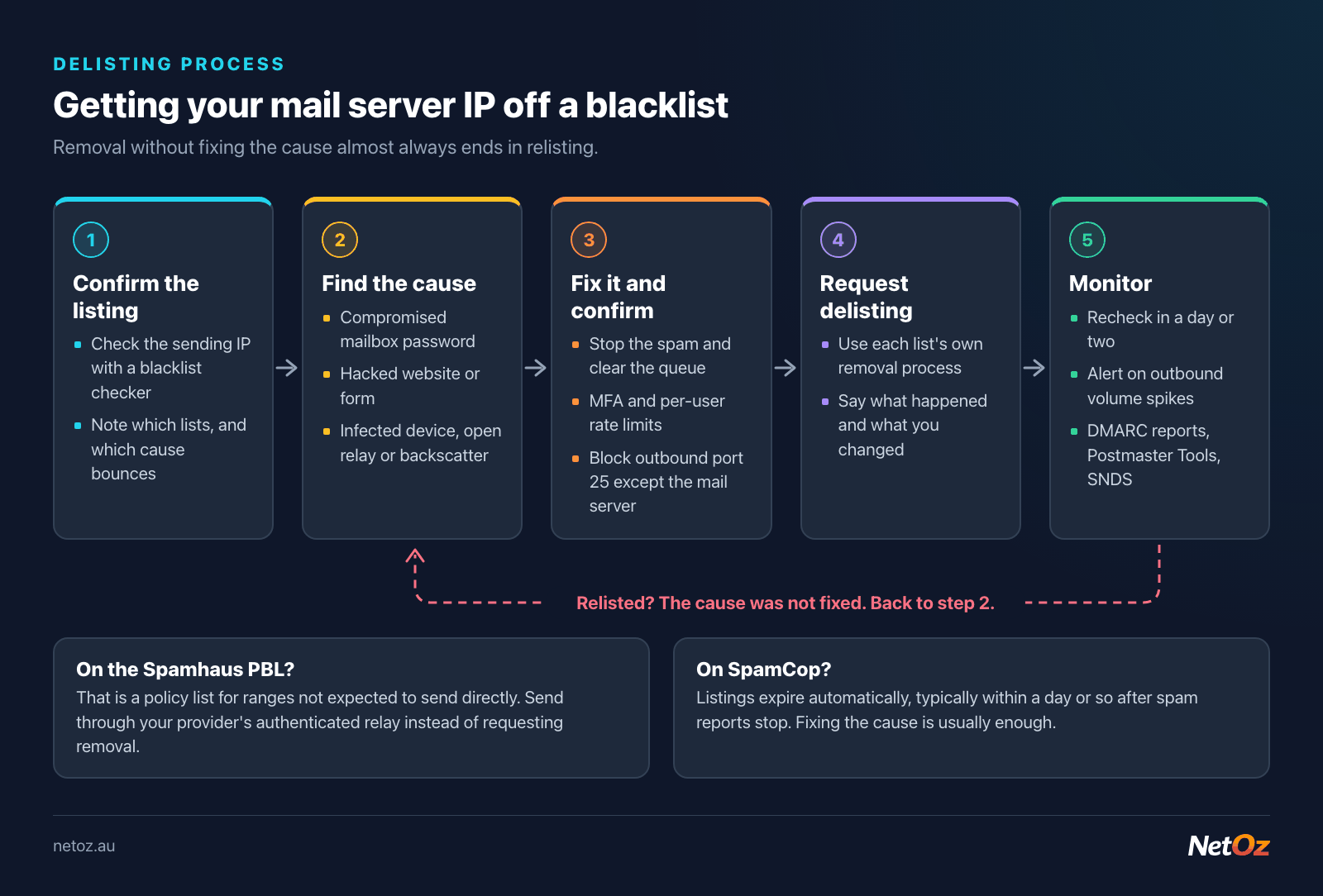
This is the most important step and the one most often skipped. Delisting without fixing the cause almost always ends in relisting, and some lists make it harder to get removed the second time.
The listing details on the blocklist's website usually give a reason or category. Combine that with your own logs. The common causes are:
A compromised email account
Probably the most common cause for small businesses. An attacker gets a staff member's password, often through phishing or a reused password from another breach, and uses it to send spam through your server with authenticated SMTP.
Signs: a sudden spike in outbound mail from one account, a full outbound queue, bounce messages for mail the user never sent, logins from unfamiliar countries.
Fix: reset the password, end active sessions, turn on multi-factor authentication if the platform supports it, check for forwarding rules or filters the attacker may have added, and clear the outbound queue of spam before it goes out.
A compromised website or form
A vulnerable plugin, an unprotected contact form, or an old PHP script on the same server can be used to send spam through the local mail system.
Signs: lots of outbound mail generated by the web server user (such as www-data), messages with no authenticated user, unfamiliar PHP files.
Fix: update or remove the vulnerable code, add CAPTCHA or rate limiting to forms, and consider sending website mail through an authenticated relay rather than directly.
An infected device on your network
If your office or server shares a public IP with workstations, one infected computer can send spam or connect to criminal infrastructure. This typically leads to an XBL listing.
Fix: identify the device (firewall logs showing outbound connections on port 25 from anything other than the mail server are a strong clue), clean or rebuild it, and block outbound port 25 at the firewall for everything except your legitimate mail server.
An open relay
A mail server configured to accept and forward mail from anyone, to anyone, will be found and abused quickly. Our mail server check includes an open relay test.
Fix: restrict relaying to authenticated users and your own networks only.
Backscatter
Your server accepts spam with forged senders, then sends bounce messages to the forged addresses. Those innocent people receive your bounces, and some lists treat that as spam.
Fix: reject invalid recipients during the SMTP conversation instead of accepting and bouncing later.
Missing or generic reverse DNS
Some lists, and many receivers, penalise IPs without a proper PTR record or with one that looks residential. This is less about "spam" and more about looking like a legitimate mail server. See our post on reverse DNS and FCrDNS for mail servers.
A PBL listing
If you are on the Spamhaus PBL, your IP is in a range that the network owner (usually your ISP) has said should not send mail directly. The normal fix is not to delist, but to send through your ISP's or email provider's authenticated relay. If you genuinely run a properly configured mail server on a static IP, Spamhaus does provide a way to remove individual IPs from the PBL, and some ISPs let you request a static IP that sits outside their PBL ranges.
Step 3: Fix the cause, then confirm it is fixed
Before requesting removal:
- Stop the spam. Clear the outbound queue, disable the compromised account or script, and make sure nothing else is still sending.
- Watch the logs for a few hours, or a day if you can, to confirm outbound volume is back to normal.
- Tighten things up: MFA on mail accounts, rate limits on outbound mail per user, blocking outbound port 25 from anything that is not your mail server, and up-to-date software.
- Check your basics: PTR record, SPF, DKIM and DMARC. Use the SPF validator to confirm SPF is valid.
Step 4: Request delisting
Each list has its own process, but most follow the same pattern. Go to the list operator's website (for example spamhaus.org, barracudacentral.org or spamcop.net), look up your IP, and follow the removal instructions shown for that listing.
In general terms:
- Spamhaus: look up the IP on the Spamhaus website. The result explains which list it is on and, where self-service removal is available, offers a removal option. Some SBL listings require the network owner (your hosting provider or ISP) to contact Spamhaus rather than you. Removals are usually processed quickly once the cause is fixed, but repeated listings are treated more strictly.
- Barracuda: Barracuda Central provides a lookup and a removal request form. You will typically need to give the IP, a contact email and a short explanation of what you fixed. Requests are reviewed rather than instant.
- SpamCop: listings expire automatically, typically within a day or so after spam reports stop. There is usually nothing to request; fixing the cause is enough.
- Microsoft (Outlook.com, Hotmail, Microsoft 365): Microsoft uses its own internal reputation systems, not just public lists. If Microsoft is rejecting your mail with a block message, the bounce usually explains the next step, which is generally a delisting request through Microsoft's sender support. Their Smart Network Data Services (SNDS) programme also shows how Microsoft sees your IP.
- Other lists: read the listing policy carefully. Be cautious about lists that charge for fast removal; if a list is not widely used, it may be better to let the listing expire while you focus on the lists that matter.
When you write a removal request, be specific and honest: what happened, when, and what you changed. "A staff password was phished on Monday; we reset it, enabled MFA, cleared 3,000 queued messages and added per-user sending limits" is far more convincing than "please remove us, we are not spammers".
Step 5: Monitor and prevent
After removal:
- Recheck a day or two later with the blacklist checker to confirm you are clear on every list.
- Monitor outbound volume. An alert when an account sends far more than normal will catch the next compromise early.
- Set up DMARC reporting, which helps you see who is sending as your domain.
- Enrol in feedback programmes such as Google Postmaster Tools and Microsoft SNDS if you send regularly.
- Keep your mail server patched and review accounts that no longer need access.
When it might be time to stop running your own mail server
Running your own mail server is entirely doable, but it means you own the IP reputation, the PTR records, the security patching and the blocklist monitoring. If you keep finding yourself on this page, moving staff mailboxes to a managed provider and keeping your server only for application mail (through an authenticated relay) can take a lot of the pain away.
If that sounds appealing, NetOz email hosting is $2 per user per month from an Australian-owned provider with 24/7 support. If you would rather keep your own server and want help cleaning up a listing, contact our team.
Need a hand with hosting or networking?
NetOz provides VM, managed and email hosting, DNS and colocation from a NextDC Tier IV facility in Adelaide.